Don't Learn Dify Yet—First Learn the Map of AI Application Platforms

When people inherit an AI project, their first instinct is often to start hunting for buttons: Where do I create a knowledge base? Where do I configure the model? How do I connect workflow nodes? Where are the error logs?
After a few busy days, they know the interface and can recite the terminology. Yet they still cannot answer the far more consequential question: Why should this system use Dify in the first place?
That is not a philosophical question. It is an engineering question. Choose the wrong tool, and the better your team gets at using it, the deeper the sunk cost becomes.
Perhaps all you wanted was a reliable knowledge-base Q&A system, but you ended up building a swarm of Agents that talk to one another. Perhaps you need to move data across more than a dozen business systems, but you crammed all the logic into an AI workflow. Perhaps you need millisecond-level retrieval and precise Token control, yet expect a low-code canvas to solve everything for you.
Eventually, it looks as though "Dify is hard to use." In reality, the problem should never have been handed entirely to Dify in the first place.
So before we deploy Dify or start using it in earnest, let's stop clicking for a moment.
This article will not teach you how to drag nodes onto a canvas. It will give you a map: what AI application development platforms are actually built to solve, how Workflow, Chatflow, and Agent differ, and where Dify sits in the broader ecosystem.
Tools evolve and interfaces get redesigned. Judgment does not expire.
The Hard Part of AI Application Development Is Not Calling a Model Once
Calling an LLM API is not difficult. Write a Prompt, pass in the user's input, retrieve the model's output, and a minimal demo can be running in no time.
But between a demo and a production application lies an entire layer of engineering problems:
- How should documents uploaded by users be parsed, chunked, vectorized, and retrieved?
- How can one application switch between models while managing keys, parameters, and invocation costs?
- Under what conditions should the model call search, a database, or an internal API?
- How should multi-step tasks be chained together, and how should failures be retried?
- Where should conversation history live, and which information belongs in the model context?
- After changing a Prompt, how do you know whether the results improved or deteriorated?
- When something breaks in production, how do you reconstruct the complete invocation?
- How do you embed AI capabilities into an existing website, App, or business system instead of leaving them forever trapped in a demo page?
The value of an AI application development platform is that it packages this recurring infrastructure.
These products are not merely "better-looking chatbot builders." They are attempts to bring models, data, tools, processes, and business interfaces into one engineering system.
The real difference between them is not whose canvas looks prettier. It is how much of the stack each product chooses to abstract—and how much control it leaves in your hands.
What Exactly Is Dify?
The name Dify comes from Define and Modify. It is an apt description: define an AI application first, then keep modifying it based on real operational data.
Dify officially describes itself as an open-source LLM application development platform and LLMOps platform.
In plain English, it aims to provide a complete AI application studio. You can connect models, write Prompts, orchestrate processes, build knowledge bases, configure Agents, inspect runtime logs, and finally expose the application to real business systems through an API.
Its core capabilities fall into roughly seven categories.
1. Visual Workflows
Developers use nodes and connections to organize inputs, model invocations, knowledge retrieval, conditional branches, code execution, tool calls, and outputs.
The canvas lowers the cost of understanding a process. It also gives product, operations, and engineering teams a shared diagram around which they can discuss business logic.
2. Unified Model Management
Dify can connect to a large number of proprietary and open-source models. Application logic does not have to be permanently tied to one model vendor, allowing teams to switch models according to quality, cost, latency, and compliance requirements.
That does not mean changing models is always "painless." Models still differ in context length, tool-calling capabilities, and how well they follow instructions.
But a unified integration layer at least prevents you from rewriting the entire application every time you change providers.
3. Prompt IDE
A Prompt no longer has to be a string scattered somewhere in the codebase. Developers can edit, debug, and compare results in the interface, using variables to create reusable prompt templates.
4. RAG Pipeline
RAG, or retrieval-augmented generation, is one of the most common approaches to enterprise AI applications.
Dify covers the complete chain from document ingestion and chunking to indexing, retrieval, and answer generation. It is well suited to quickly building internal knowledge Q&A, customer-support assistance, and document-retrieval applications.
5. Agents and Tool Calling
Dify supports Agent patterns such as Function Calling and ReAct. Through built-in tools and plugins, it can connect to search, computation, image generation, and external services.
The model can do more than "talk." It can take action within controlled boundaries.
6. LLMOps and Monitoring
Once an application is live, teams can inspect invocation logs, inputs, outputs, and runtime status, then adjust Prompts, models, and processes using real production data.
For enterprise projects, this is often more important than getting the first demo to run.
7. Backend-as-a-Service
Capabilities built in Dify can be exposed to external systems through APIs.
Dify can provide a ready-made web interface, or step back into the backend and serve as the AI capability layer behind a website, mobile client, or internal system.
For deployment, Dify offers an official hosted cloud service, self-hosted deployment, and enterprise plans for organizations. Self-hosting can usually begin with Docker Compose. Organizations with stricter requirements around single sign-on, fine-grained access control, and similar capabilities will need to evaluate the enterprise edition alongside Dify's current official offerings.
Precisely because it covers so much ground, Dify can leave beginners with a dangerous impression: that every AI application can be solved with a single canvas.
The first step toward avoiding that mistake is distinguishing between several application patterns that are routinely conflated.
Workflow, Chatflow, and Agent Are More Than Three Menu Options
Many tutorials simply tell you to "click Create App" without explaining why several options appear next.
Beginners end up choosing by name, only to discover halfway through that the context model, inputs and outputs, or execution behavior does not match what they expected.
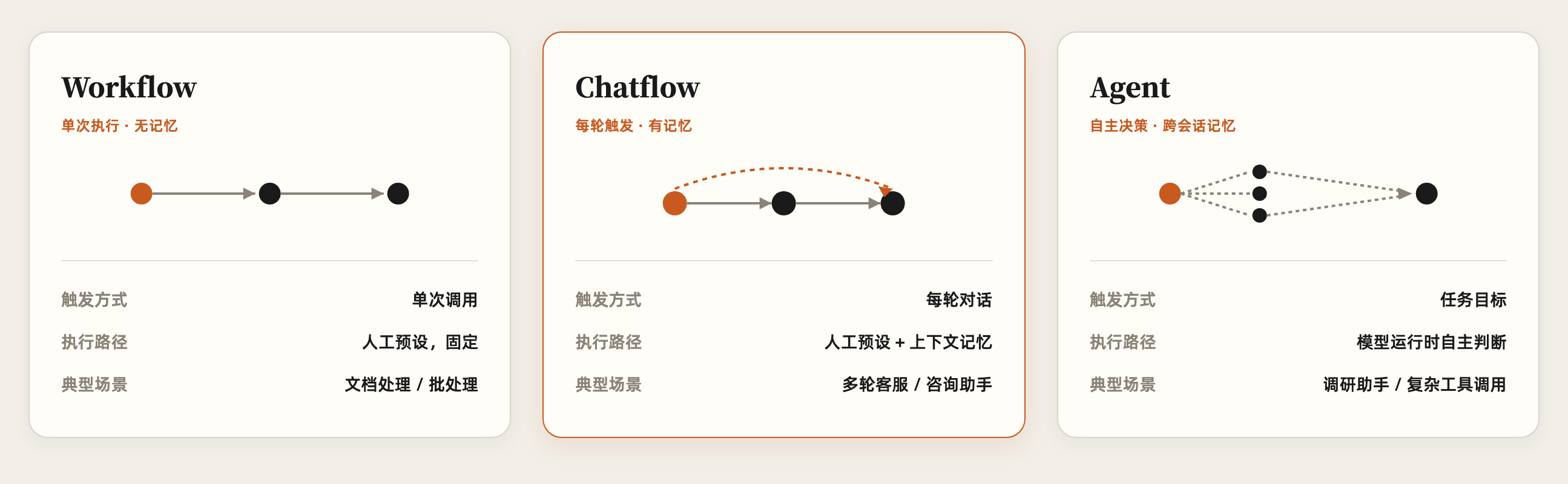
Dify's application types share the same workflow engine, but they address different interaction models. Start with the execution logic behind the three most easily confused options—Workflow, Chatflow, and Agent:
Now compare the complete table of application types:
| Application Type | Core Characteristics | Typical Use Cases |
|---|---|---|
| Workflow | Triggered once and executed once, with no inherent conversational memory | Document processing, content generation, data extraction, business backends, batch processing |
| Chatflow | Triggered on every conversational turn, with conversation variables and memory configuration | Multi-turn customer service, knowledge Q&A, advisory assistants |
| Chatbot | A simplified chat assistant that does not require you to build the complete process yourself | Quickly launching a basic Q&A bot |
| Agent | The model can reason, break down tasks, and choose tools autonomously | Research assistants, task-execution assistants, complex tool calling |
| Text Generator | A simplified application for single-turn text tasks that can also run in batches | Summarization, rewriting, classification, structured generation |
The fundamental dividing line between Workflow and Chatflow is not the number of nodes. It is whether the application has a conversational context.
Suppose you need to process a contract. The user uploads a file, the system extracts the two parties, amount, and date, then outputs JSON. The task has clearly defined inputs and outputs and ends after one execution. Workflow is the more natural fit.
Now suppose the user wants to keep asking questions about that contract: "What are the payment terms?" "What happens if payment is delayed?" "Turn those two points into an email." The final request depends on the preceding conversation. That is the abstraction Chatflow was designed for.
Agent is something else again. In a conventional Workflow, a human usually defines the execution path in advance: retrieve first, evaluate next, generate last. An Agent lets the model decide the next step at runtime. It might search for information, discover that the results are insufficient, call another tool, and then construct an answer from the results.
That makes it more flexible—but also less predictable, harder to test, and more difficult to control in terms of cost and security boundaries.
A practical rule follows:
If a task can be solved with a deterministic process, do not rush to hand it to an Agent.
Autonomy is not free. Every additional layer of "let the model decide" adds another layer of uncertainty to the system.
Production systems are rarely trying to look as intelligent as possible. They need to be intelligent enough while remaining explainable, testable, and recoverable when things go wrong.
Zoom Out: This Is Not a Leaderboard of Identical Products
The AI application ecosystem is full of tools with similar-sounding names, but they are not all solving the same problem.
Putting every product into one enormous feature checklist and ticking boxes may look objective. In practice, it is an excellent way to produce misleading conclusions.
A more useful approach is to examine them by their degree of abstraction and the amount of control they provide.
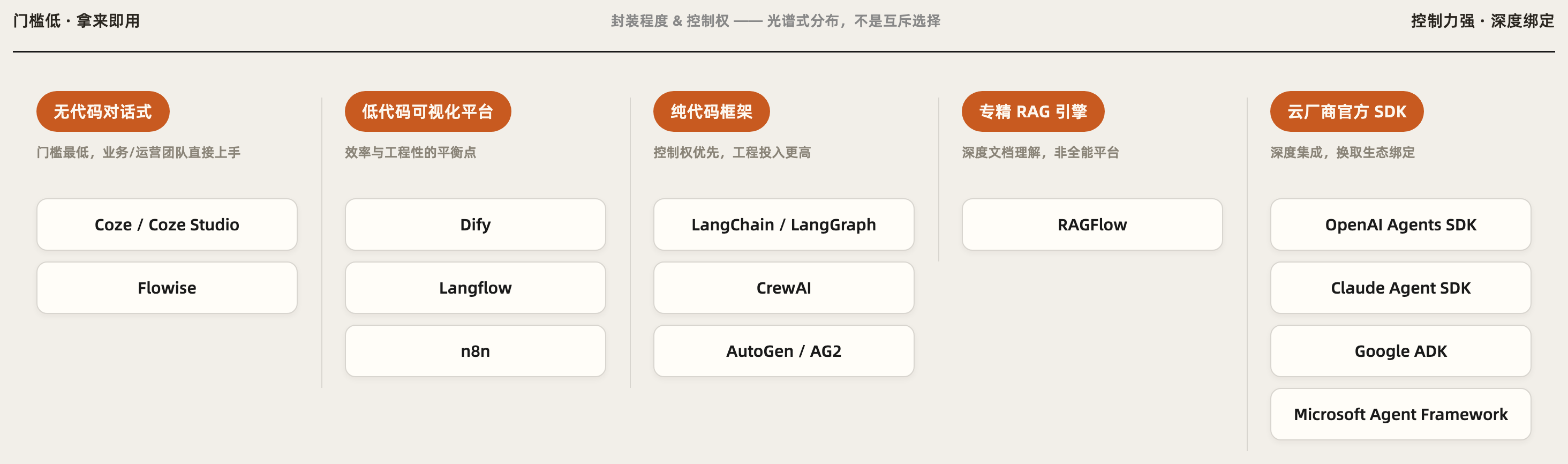
No-Code Conversational Tools: Get the Business Running First
These products emphasize a low barrier to entry. Users configure roles, knowledge, and plugins through natural language and can quickly produce their first conversational Agent.
ByteDance's Coze is a representative example. The open-sourced Coze Studio supports self-hosting.
These tools suit business users, operations teams, and early-stage validation. First determine whether users actually need the bot; only then decide whether to invest in heavier engineering.
The trade-off is that once the process accumulates conditional branches, exception handling, and fine-grained state management, the simplicity that made the product attractive can become a constraint.
Flowise also appears frequently among rapid prototyping tools. It provides a visual wrapper around the LangChain ecosystem, has a lightweight basic deployment, and works well for quickly validating chained invocations.
As complex multi-step processes and conditional logic accumulate, however, teams tend to hit its limits relatively early.
Low-Code Visual Platforms: Balancing Speed and Engineering Rigor
Dify sits in this quadrant. It is not aimed at users with no technical knowledge whatsoever. It serves developers and technical product managers who want to write less infrastructure code while retaining a meaningful degree of engineering control.
In the same quadrant, Langflow is closer to a visual IDE for LangChain and LangGraph. It supports stateful workflows, loops, and custom Python nodes.
For teams that need canvas-based collaboration but are unwilling to surrender LangGraph's control, Langflow deserves serious consideration.
n8n also has a canvas, but it should not be treated as a straightforward substitute for Dify. It is first and foremost a general-purpose workflow automation platform. Its strength lies in connecting messaging tools, CRMs, databases, and numerous other non-AI systems. AI is merely one component in the process.
In practice, "n8n handles system integration and routing, while Dify handles knowledge retrieval and model reasoning" is often more sensible than choosing one or the other.
Code-First Frameworks: Control Comes First
LangChain provides Python and JavaScript components for building code-first, composable LLM application pipelines.
It offers substantial freedom, but that freedom means the engineering team must assume more responsibility for architecture, testing, deployment, and observability.
LangGraph is built on the LangChain ecosystem and designed for stateful, graph-structured Agent orchestration. It excels at loops, conditional branches, persistent memory, parallel execution, and Human-in-the-loop workflows.
When a complex process demands precise control, recoverable execution, or rigorous state management, LangGraph is usually a better fit than a low-code canvas. It has reached a stable release stage and is used in production by multiple large enterprises.
Multi-agent systems introduce another set of approaches. CrewAI structures collaboration through role definitions such as Role, Goal, and Backstory, making it a good fit for business automation with relatively structured processes.
AutoGen and its community fork AG2 place greater emphasis on conversational, dynamic negotiation between multiple Agents. Both project lines remain actively maintained and are better suited to research-heavy tasks whose paths cannot be fully determined in advance.
None of this means "code is inherently more advanced than low-code." Code buys control, but it also carries development and maintenance costs.
The real question is whether your project is complex enough to justify paying them.
Specialized RAG Engines: Going Deeper on Retrieval
RAGFlow focuses on deep document understanding and retrieval, rather than trying to become an application development platform that handles every part of the stack.
Dify's built-in RAG is highly effective for small knowledge bases and POCs: fewer components to assemble, faster time to a complete working loop.
But when document volume, concurrency, and retrieval-quality requirements rise substantially, the built-in capabilities of a general-purpose platform may no longer be the best answer. At that point, RAGFlow can serve as the specialized retrieval layer, while Dify or LangChain handles application orchestration.
Production architectures are often assembled from several products, not selected as a single answer from a list.
Official Cloud-Vendor SDKs: Deeper Integration in Exchange for Ecosystem Lock-In
OpenAI Agents SDK, Claude Agent SDK, Google ADK, and Microsoft Agent Framework—which brings together the AutoGen and Semantic Kernel approaches—represent another option: build around a particular model or cloud ecosystem in exchange for more direct, deeper capability integration.
These solutions suit teams whose technology stacks and procurement systems are already firmly tied to a specific cloud vendor.
Their drawback is equally clear: the more fully you exploit vendor-specific capabilities, the higher the eventual cost of moving to another ecosystem is likely to be.
Don't Ask "Which Is Best?" Ask What Kind of Project You Have
Tool selection does not require a scoring matrix stuffed with dozens of features. Identify the project's central problem first, and the answer is usually already close.
| Your Primary Scenario | Consider First | Rationale |
|---|---|---|
| A business team needs to build a conversational bot quickly without writing code | Coze/Coze Studio, Flowise | Fast to learn; well suited to validating demand and simple processes |
| Knowledge-base Q&A, customer service, or an internal document system that requires self-hosting | Dify | Relatively complete RAG, workflows, model management, monitoring, and APIs |
| A complex, stateful Agent requiring loops, retries, and fine-grained control | LangGraph, or Langflow | Stronger control over state, branches, loops, and persistence |
| Automation across multiple business systems, with AI as only one part | n8n, potentially combined with Dify | System connectivity and process routing are the real priorities |
| A large-scale knowledge base with high concurrency and demanding retrieval-quality requirements | RAGFlow as the retrieval layer | Specialized in document understanding and the RAG pipeline |
| Multi-agent collaboration with clearly defined roles and structured processes | CrewAI | An intuitive role model that makes processes easier to constrain |
| Open-ended research and dynamic negotiation between Agents | AutoGen/AG2 | Greater emphasis on conversation and dynamic collaboration |
| Deep dependence on one model provider and its cloud services | The corresponding vendor SDK or cloud platform | Native integration takes priority over platform neutrality |
Three more questions deserve to be asked repeatedly in every technology-selection meeting:
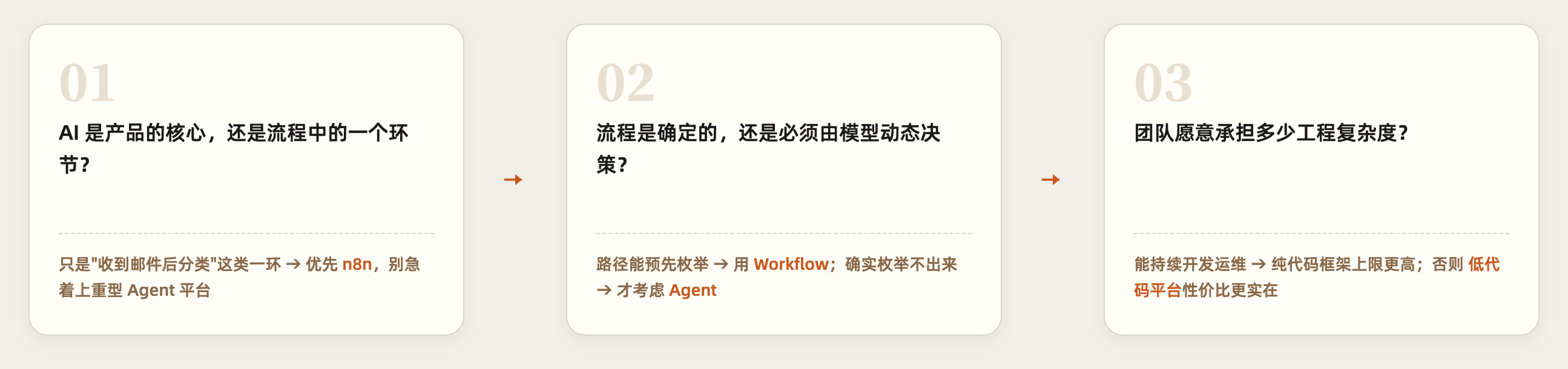
Dify's advantage is not that every individual capability is the deepest in the industry. It is that low-code visualization, RAG, Agents, model management, plugins, monitoring, and API delivery all come together in one platform.
It occupies a genuinely useful middle ground: more complete than lightweight bot-building tools, but far less infrastructure-intensive than starting from a code-first framework.
Chinese Platforms Need Their Own Lens—They Do Not Fit Neatly into the Same Table
Chinese LLM platforms are often compared side by side, but the category includes cloud-vendor middleware platforms, open-source application platforms, and workplace Agents designed for end users.
These are not equivalent product forms. Forcing them into a line-by-line scorecard only distorts the conclusion. Still, a quick-reference table is useful before examining each one:
| Platform | Owner | Positioning | Private Deployment | Relationship to Dify |
|---|---|---|---|---|
| Alibaba Cloud Model Studio | Alibaba Cloud | Cloud middleware platform for large models | Supported | Cloud-vendor middleware vs neutral open source; not direct competitors |
| Qianfan AppBuilder | Baidu AI Cloud | Integrated application platform for government and enterprise | Supported (fully private/hybrid cloud) | Same as above |
| Coze Cloud Commercial Edition | ByteDance | Hosted SaaS service with tiered subscriptions | Not supported | Different product form; not a meaningful comparison |
| Coze Studio | ByteDance (open source) | Low-code AI application platform | Supported (Docker self-hosting) | The closest open-source competitor by positioning |
| Tencent WorkBuddy | Tencent | Desktop workplace Agent | Supported (intranet components) | Different category; not competing in the same selection process |
Alibaba Cloud Model Studio: Cloud Middleware for Large Models
Alibaba Cloud Model Studio is a one-stop platform for large-model services and application development. It aggregates the Qwen family and major third-party models, covering model invocation, fine-tuning, knowledge bases, Agent development, and application deployment. It also offers private-deployment and dedicated-model solutions.
Its fundamental difference from Dify is not whether it has one node more or less. The two occupy different strategic positions. Model Studio is a large-model middleware platform within the Alibaba Cloud ecosystem, where models, compute, and cloud services can work in deep coordination. Dify places greater emphasis on neutrality across models and infrastructure.
Model Studio's public services are generally billed by actual usage. Policies for new users and private-deployment offerings may change, so current quotas and prices should be verified on the official website and through a formal quotation.
Baidu AI Cloud Qianfan AppBuilder: A Complete Toolchain for Government and Enterprise
Qianfan AppBuilder provides RAG, Agents, workflows, UI Builder, and other capabilities. It offers both fully private deployment and a hybrid option in which the platform is privately deployed while models are consumed from the public cloud.
It likewise functions as cloud-vendor middleware. For organizations already using Baidu Cloud's models and compute stack, and requiring delivery support for government or enterprise projects, that integration may be an advantage. If a team values the freedom to switch models and infrastructure, Dify's neutral positioning is more attractive.
For the latest pricing and commercial terms for private deployment, check the official information.
Tencent WorkBuddy: It Is Not the Same Kind of Product as Dify
WorkBuddy is a desktop Agent for workplace scenarios, emphasizing a local sandbox, multi-model orchestration, and a security gateway. It also provides deployment components suitable for enterprise intranets.
It serves workplace tasks in data-sensitive industries such as finance, healthcare, and law.
But it is not a general-purpose low-code AI application development platform. Comparing WorkBuddy with Dify by node count or workflow capabilities is like comparing an office suite with a development framework. Both may enter the same enterprise, but they are not necessarily competing for the same position.
There is not enough authoritative, stable public pricing information available, so current details should be verified on the official website.
Coze Must Be Understood as Two Separate Product Lines
The question "Can Coze be privately deployed?" so often produces contradictory answers because people are not talking about the same product.
Coze Cloud Commercial Edition is a hosted service with tiered subscriptions. It does not itself support private deployment.
Coze Studio follows a different path. It was open-sourced under the Apache 2.0 license in 2025, includes both frontend and backend components, supports Docker-based self-hosting, and is decoupled from the cloud edition.
Coze Studio—not Coze Cloud Commercial Edition—is the product that genuinely belongs in the same comparison as Dify.
Coze Studio has a low barrier to entry and offers a friendly conversational Agent experience. It quickly attracted attention after becoming open source. Dify is currently more mature in terms of third-party tutorials, documentation, and accumulated production experience, while also providing more complete control over complex workflows.
Licensing is another factor enterprises cannot afford to ignore. Coze Studio uses the standard Apache 2.0 license. Dify uses the Dify Open Source License, which is based on Apache 2.0 with additional terms.
Both can be studied and self-hosted. But when redistribution, commercialization, or multi-tenant services are involved, teams should read the current licenses clause by clause. Seeing the words "open source" does not mean the rights are identical.
In one sentence: Dify is a neutral, open-source AI application development platform that is not tied to a single cloud vendor and allows models to be switched; Model Studio and Qianfan are closer to enterprise-grade large-model middleware platforms bound to their respective cloud ecosystems; Coze Studio is the closest open-source competitor by positioning; and WorkBuddy is a workplace Agent product, not a direct competitor in the same technology-selection process.
Why This Series Ultimately Chooses Dify
There are two bad extremes when learning a tool.
The first is learning only how to operate the interface. The moment a new version changes the screenshots, you are lost.
The second is pursuing "control of the underlying stack" so aggressively that you begin on day one by hand-writing every model adapter, vector-retrieval component, state-management mechanism, and monitoring system. The project never reaches a complete business loop.
Dify offers an unusually useful cross-section for learning.
On its canvas, you can directly see the parts that make up an AI application: how input enters the system, how knowledge is retrieved, how a Prompt organizes context, when a model calls a tool, how results pass through branches and transformations, and how runtime data feeds back into debugging.
It hides some of the infrastructure without hiding all the essential concepts.
For someone with a technical foundation who is taking over a self-hosted AI platform for the first time, that balance matters: the structure remains visible, but you do not have to pour the foundation yourself.
More practically, if what you are facing is already an internally hosted Dify installation, your goal should not be merely to "learn how to create a chatbot."
You need to develop three layers of capability:
- Understand why existing applications were designed the way they were;
- Determine whether a failure originates in the model, knowledge base, workflow, or infrastructure;
- Know when to keep using Dify and when to bring in n8n, RAGFlow, or a code framework to cover its limits.
That is the difference between taking over a project and trying out a product.
In the next article, we will finally enter the machine room. Starting with deployment architecture, dependencies, configuration, and data persistence, we will build a maintainable private Dify deployment.
By then, Docker Compose will no longer be a magical "one-click startup" incantation. You will know exactly what that click starts—and where to begin looking when any of it breaks.