MCP Python SDK 2.0 Is Not Just a Rename
You upgrade mcp, fix the first ModuleNotFoundError, and assume the rest of the job will be a few import changes. The dangerous failures, however, may not raise an exception. Your program can keep running while configuration and data quietly acquire different meanings.
Here is MCP in plain language. The Model Context Protocol is a little like a shared USB interface for AI: tools, files, and databases may work differently internally, but an AI application can discover and use them through a common contract. The Python SDK is the toolkit that implements this contract so you do not have to build message formats, connections, and error handling from scratch. If you work on AI tools, agents, or knowledge applications, this upgrade matters even when you never touch protocol internals.

That is the real story of MCP Python SDK 2.0. The visible layer contains renamed APIs. Underneath it, the SDK adopts a different operating model.
My view is straightforward: renaming FastMCP is not the important change. The important change is moving from “keep a connection open and continue the conversation” to “include the necessary context in each request.” A high-level decorator project should have a manageable migration. A project using the low-level Server, reverse requests, or multiple replicas should treat this as a small architecture migration.
Decide Whether to Migrate or Pin
Upgrading a foundational dependency is like replacing a building’s electrical system. If you cannot inspect every outlet today, do not let someone replace the main panel unattended.
SDK 2.0 is stable, and an unconstrained pip install mcp installs 2.x. The 1.x line is in maintenance mode and receives only security and critical fixes.
If you cannot complete compatibility testing yet, pin the old line explicitly:
mcp>=1.28,<2
This tells your dependency manager not to move into 2.0 automatically.
For an actively developed project, though, I would not remain on 1.x indefinitely. Version 2 addresses foundational issues involving connections, horizontal scaling, and observability. The longer you wait, the more code you build around the old assumptions.
First classify the project:
- It mainly uses
@mcp.tool(),@mcp.resource(), and@mcp.prompt(): migration is usually controlled. - It uses the low-level
Server, custom handlers, subscriptions, or reverse requests: review the interaction model itself.
Do not estimate the work by line count alone. A small project deeply coupled to old sessions can be harder to migrate than a much larger high-level server.
From a Phone Call to a Postcard
A legacy session is like a phone call. You dial first, keep the call connected, and rely on the same conversation remaining alive.
A modern MCP request is closer to a postcard. Each card includes its own address and the information needed to process it, so any suitable worker can handle it without finding the person who answered last time.
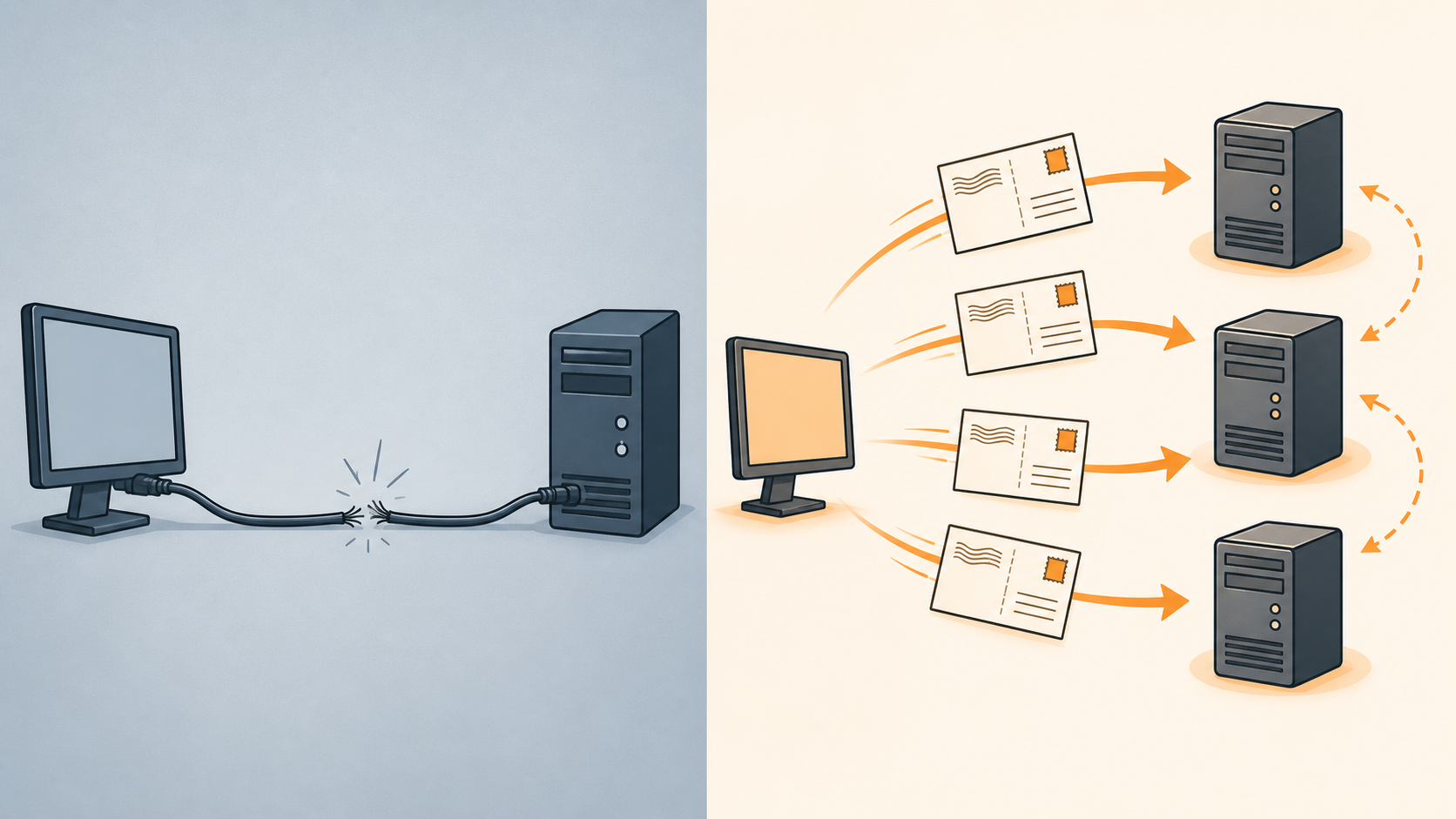
MCP 2026-07-28 removes the initialization handshake and long-lived protocol session. Each request carries the protocol version and client capabilities, allowing any server replica to process it.
This changes deployment. Streamable HTTP requests no longer need Mcp-Session-Id, so ordinary round-robin routing can replace sticky routing used solely for MCP sessions.
Do not turn that into “the whole system is stateless.”
Earlier clients still require sessions. Multi-round interactions carry request_state, and replicas must share RequestStateSecurity(keys=[...]). Subscriptions need a shared SubscriptionBus. Without those pieces, a second replica may be unable to validate state created by the first.
My recommendation is to separate the work: migrate the source first, then perform a dedicated multi-replica review. Independent requests do not synchronize application state automatically.
Modern clients use server/discover to learn about the server. Think of it as asking, “Which features and protocol version do you support?” The high-level Client defaults to mode="auto", trying modern discovery first and falling back to legacy initialize.
The following code reads the negotiated values. Some of them previously had to be captured from the initialization result; they are now stored as properties:
capabilities = session.server_capabilities
server_info = session.server_info
instructions = session.instructions
version = session.protocol_version
The referenced official material does not provide a complete direct ClientSession.discover() example. If you are implementing a custom client or gateway, verify the API Reference instead of reconstructing the wire request from high-level behavior.
Change the Server Name—and Check Its Arguments
A renamed class is like a store moving to a new address: the change is simple, but the old address no longer works.
This is the old FastMCP import:
# Before
from mcp.server.fastmcp import FastMCP

mcp = FastMCP("Demo")
Version 2 uses MCPServer:
# After
from mcp.server.mcpserver import MCPServer, Context

mcp = MCPServer("Demo")
You may also import MCPServer from mcp.server. The old path is not a deprecated alias. It has been removed and raises ModuleNotFoundError.
Positional arguments are more dangerous. Think of them as numbered boxes on a form: if a new box is inserted, the value that used to belong in box two may now mean something else.
The old constructor treated its second positional value as instructions:
# Before
mcp = FastMCP(
    "Demo",
    "You answer questions about the weather.",
)
Version 2 adds title and description, so name the argument explicitly:
# After
mcp = MCPServer(
    "Demo",
    instructions="You answer questions about the weather.",
)
The old shape may keep running while silently storing the text as title. During migration, keep only name positional and make the other arguments keywords. Pass the application server’s version explicitly too; otherwise v2 reports an empty string.
MCPServer.get_context() is gone as well. Context is the information attached to this particular request, rather like the tracking details on one shipment. Previously a tool could retrieve it implicitly; now it appears in the function signature.
The old tool fetches Context from ambient state:
# Before
@mcp.tool()
async def my_tool(x: int) -> str:
    ctx = mcp.get_context()
    await ctx.report_progress(1, 2)
    return str(x)
The new tool declares the dependency explicitly:
# After
from mcp.server.mcpserver import Context

@mcp.tool()
async def my_tool(x: int, ctx: Context) -> str:
    await ctx.report_progress(1, 2)
    return str(x)
This is a breaking change worth accepting. You can see the dependency immediately, and tests can replace and inspect it more easily.
Adopt the Unified Client Early
A 1.x client was like arranging a car, driver, and route separately for every trip: create the transport, create ClientSession, and call initialize() yourself.
The high-level Client provides one entry point for an in-process Server object, HTTP URL, stdio parameters, or a custom transport.
The old test helper manually creates connected server and client sessions:
# Before
from mcp.shared.memory import create_connected_server_and_client_session

async with create_connected_server_and_client_session(server) as session:
    result = await session.call_tool("my_tool", {"x": 1})
The new form hands the Server directly to Client, which connects and negotiates when entering the context manager:
# After
from mcp.client import Client

async with Client(server) as client:
    result = await client.call_tool("my_tool", {"x": 1})
I would make this an early migration step. Local tests and deployed transports can then share the same calling interface, making protocol differences easier to isolate.
There is one trap. Client(server) uses the modern protocol by default. If a tool still calls ctx.elicit(), Sampling, or Roots, it is like mailing a postcard and suddenly expecting the recipient to answer a live phone call. There is no modern back-channel, so the SDK raises NoBackChannelError.
Use the following only when testing the legacy path:
Client(server, mode="legacy", ...)
It is a compatibility tool, not a permanent solution.
The Server Can No Longer Pause and Question the Client
The old model resembled a support call: if the server discovered missing information halfway through, it could immediately ask the client.
The modern model resembles submitting paperwork at a service counter. If something is missing, the counter returns a request for that information. You obtain it and submit the task again with the answer.
The high-level API expresses this multi-round flow through Resolve:
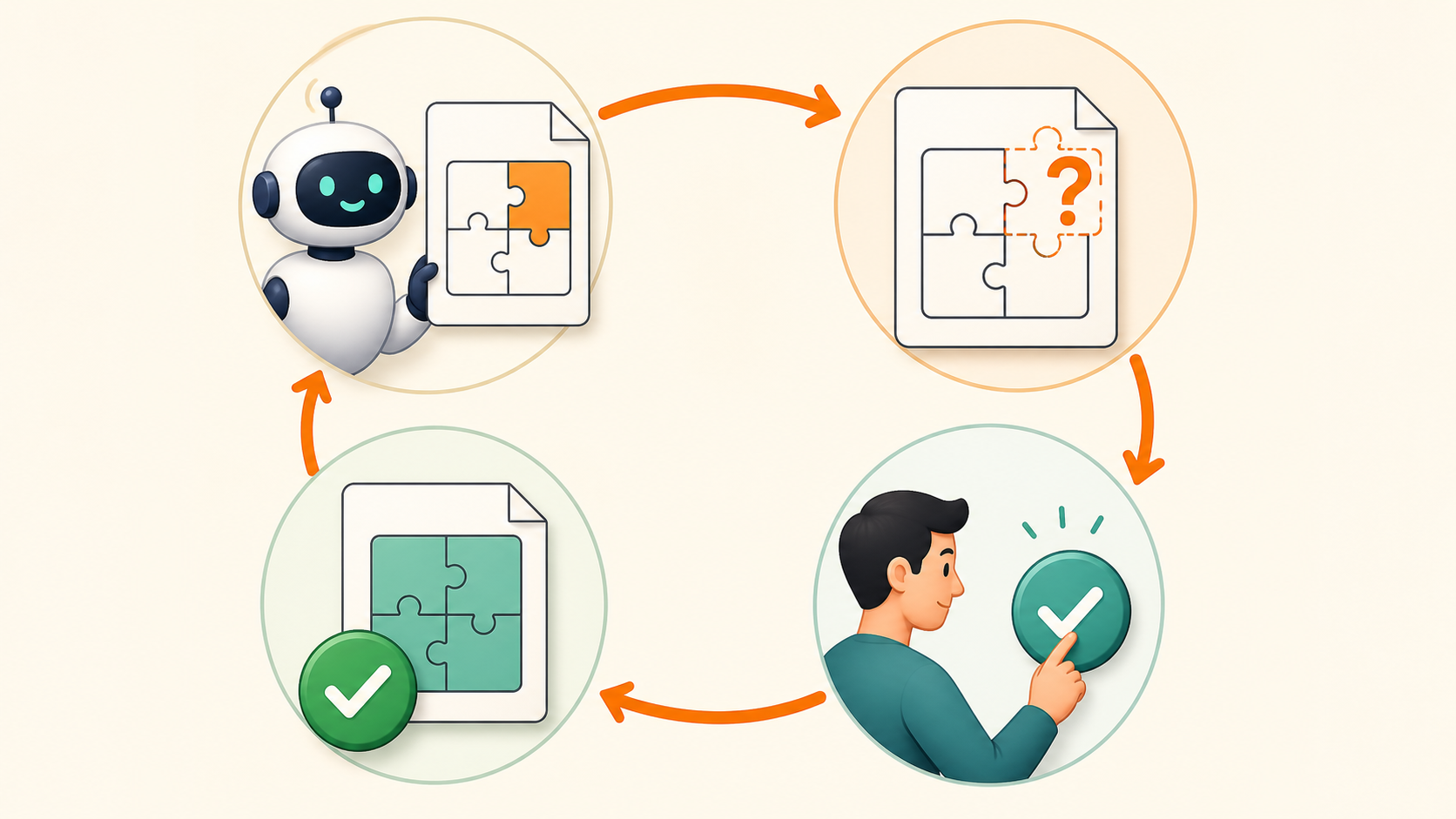
The old tool invokes ctx.elicit() while running:
# Before
@mcp.tool()
async def book_table(date: str, ctx: Context) -> str:
    result = await ctx.elicit(
        f"Book a table for {date}?",
        schema=Confirmation,
    )
    if result.action == "accept" and result.data.confirm:
        return f"Booked for {date}."
    return "No booking made."
The new form separates the confirmation request into a resolver and lets Resolve supply the answer:
# After
from typing import Annotated
from mcp.server.mcpserver import Elicit, Resolve


async def ask_to_confirm(date: str) -> Elicit[Confirmation]:
    return Elicit(f"Book a table for {date}?", Confirmation)


@mcp.tool()
async def book_table(
    date: str,
    answer: Annotated[Confirmation, Resolve(ask_to_confirm)],
) -> str:
    if answer.confirm:
        return f"Booked for {date}."
    return "No booking made."
The important property is not the syntax. answer is not exposed to the model as an ordinary tool argument. A resolver supplies it from a user, configuration, or another controlled source.
For payments, approvals, target accounts, and irreversible operations, this boundary matters. The model may express the intended action, but it must not invent facts that require human confirmation.
snake_case Looks Mechanical but Hides Interoperability Bugs
Python commonly uses snake_case, while JSON APIs often use camelCase. Think of them as a person’s local name and passport spelling: same identity, different contexts.
Version 2 uses snake_case for Python properties while retaining camelCase on the JSON wire.
The old code accesses return objects with camelCase:
# Before
result = await session.call_tool("my_tool", {"x": 1})
if result.isError:
    ...

tools = await session.list_tools()
cursor = tools.nextCursor
schema = tools.tools[0].inputSchema
The new code uses Python-style names:
# After
result = await session.call_tool("my_tool", {"x": 1})
if result.is_error:
    ...

tools = await session.list_tools()
cursor = tools.next_cursor
schema = tools.tools[0].input_schema
Search for at least .isError, .nextCursor, .inputSchema, .structuredContent, .serverInfo, .protocolVersion, and .mimeType.
When serializing models yourself, tell Pydantic to use wire aliases. The first line below produces Python field names; the second produces the protocol’s camelCase form:
tool.model_dump()
tool.model_dump(by_alias=True, mode="json")
Omitting by_alias=True may not fail locally, but another MCP implementation may not understand the output. Those “works here, fails during integration” bugs are harder to find than explicit exceptions.
Why Custom Fields Can Disappear Silently
A protocol model is like a standardized application form. Version 2 keeps the fields it recognizes and may ignore a new field scribbled into an unused area.
The following code adds unknown_field. The model does not preserve it, and it does not raise a dedicated error:
from mcp.types import CallToolRequestParams

params = CallToolRequestParams(
    name="my_tool",
    arguments={},
    unknown_field="value",
)

"unknown_field" in params.model_dump()  # False
Put extension data in the protocol’s _meta field instead:
params = CallToolRequestParams(
    name="my_tool",
    arguments={},
    _meta={
        "my_custom_key": "value",
        "another": 123,
    },
)
If you placed tenant, routing, trace, or business identifiers in custom top-level fields, move this check to the front of the migration queue. No exception warns you; the data quietly stops surviving model construction.
Low-Level Server Users Have a Rewrite
MCPServer is like ordering a prepared meal: common work such as argument handling and result wrapping is included. The low-level Server is like renting the kitchen. You get more control, but every step becomes your responsibility.
The old low-level Server registers handlers with decorators and can return a tool list directly:
# Before
from mcp.server.lowlevel.server import Server
import mcp.types as types

server = Server("my-server")


@server.list_tools()
async def handle_list_tools():
    return [
        types.Tool(
            name="my_tool",
            description="A tool",
            inputSchema={},
        )
    ]
Version 2 registers handlers through constructor on_* arguments and requires complete Result types:
# After
from mcp.server import Server, ServerRequestContext
from mcp.types import ListToolsResult, PaginatedRequestParams, Tool


async def handle_list_tools(
    ctx: ServerRequestContext,
    params: PaginatedRequestParams | None,
) -> ListToolsResult:
    return ListToolsResult(
        tools=[
            Tool(
                name="my_tool",
                description="A tool",
                input_schema={"type": "object"},
            )
        ]
    )


server = Server("my-server", on_list_tools=handle_list_tools)
Low-level call_tool no longer performs automatic JSON Schema validation or automatically wraps dictionaries, lists, and exceptions.
My recommendation is opinionated: unless you genuinely need JSON-RPC-level control, prefer MCPServer. A low-level API is not a badge of sophistication. It means validation, error conversion, and result construction belong to you.
Three Runtime Changes Worth Understanding
First, subscriptions. A subscription is like asking for delivery updates: the client opens a listening stream, and the server sends changes when they occur. Modern clients use subscriptions/listen:
async with client.listen(
    resource_subscriptions=["board://sprint"],
) as sub:
    async for event in sub:
        ...
The old subscribe_resource() and unsubscribe_resource() methods are deprecated and produce -32601 Method not found against a modern server. Servers publish changes through ctx.notify_tools_changed(), ctx.notify_prompts_changed(), ctx.notify_resources_changed(), or ctx.notify_resource_updated(uri).
The official material names these APIs but does not provide a complete shared SubscriptionBus or low-level publication implementation. Do not treat a single-process demonstration as proof of a reliable multi-replica deployment.
Second, transport configuration. Transport describes the door through which your service communicates. Its settings move out of the Server constructor and into run() or the app builder:
mcp = MCPServer("Demo")

mcp.run(
    transport="streamable-http",
    host="0.0.0.0",
    port=9000,
    json_response=True,
    stateless_http=True,
)
Third, OpenTelemetry. Think of it as attaching a tracking number to a request so you can follow its path from Client to Server to tool. Version 2 creates relevant spans and propagates traceparent through _meta.
If your application already configures a global tracer provider, the upgrade begins recording MCP spans automatically. There is currently no public switch for disabling client tracing; filter the mcp-python-sdk tracer in the telemetry pipeline when those spans must not be exported.
Three Areas Where I Would Not Guess
First, the official material describes ClientSession.discover() but does not provide a complete direct-call example. Custom clients should consult the API Reference instead of imitating the high-level client.
Second, multi-replica multi-round flows require shared RequestStateSecurity keys, but the referenced material does not fully explain request_state size, key rotation, replay protection, or privacy costs. Those remain security review items.
Third, the client-side subscriptions/listen example is clear, but complete examples for a shared SubscriptionBus, low-level publication, and subscription filtering are missing. Passing a local test does not prove that the production topology is correct.
Keeping those boundaries explicit is more credible than filling the gaps with an unofficial implementation.
A Migration Order That Reduces Surprises
Do not migrate like moving house in the dark. Use four checkpoints: inspect, test both paths, switch, and verify the deployed result.
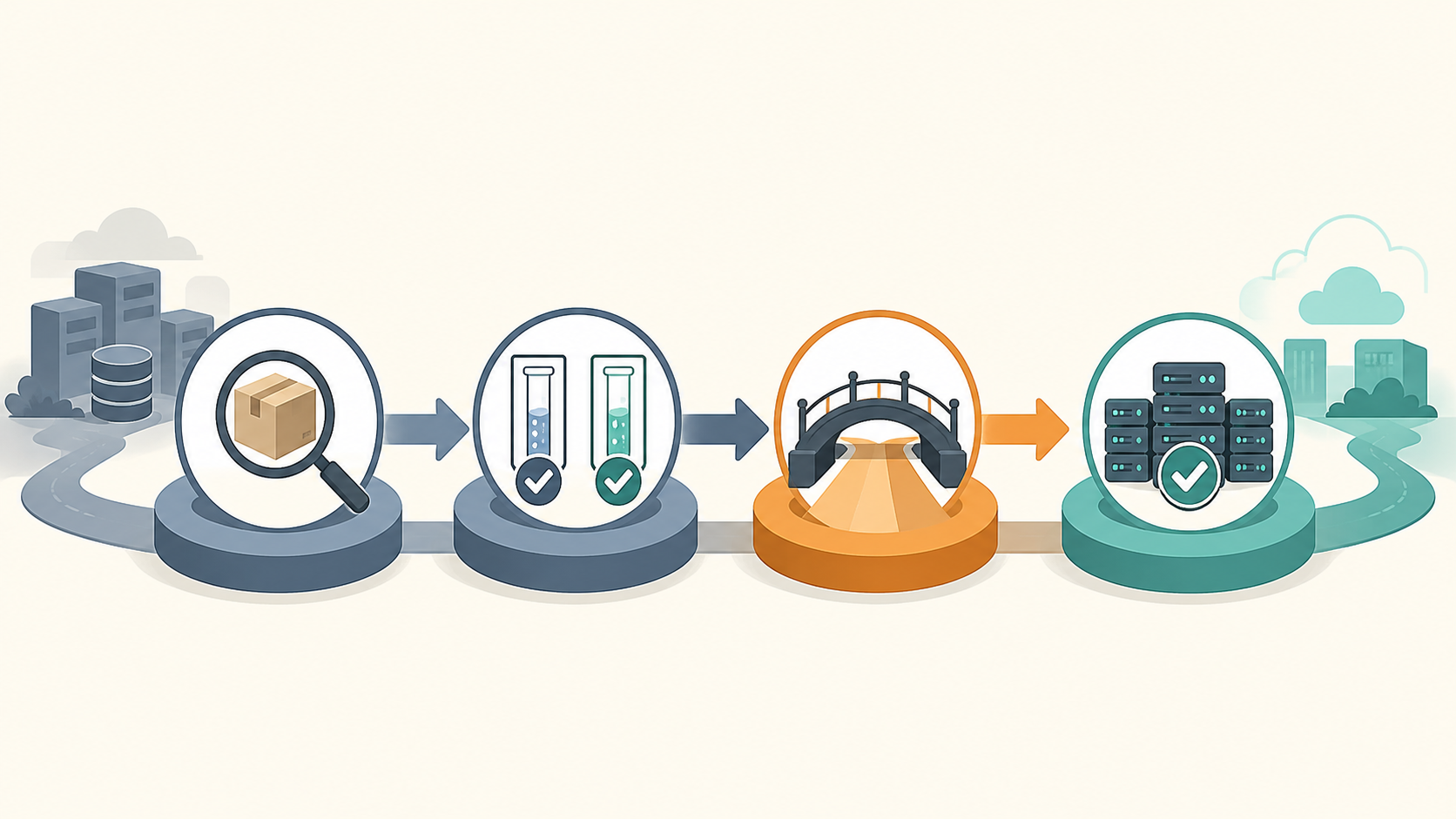
I recommend this order:
- Pin the current dependency and establish modern and legacy tests.
- Adopt the unified
Clientand identify features that depend on the old back-channel. - Search for snake_case changes, unknown top-level fields, and positional arguments.
- Migrate to
MCPServer, explicit Context injection, and the new transport configuration. - Replace
ctx.elicit()and other reverse requests withResolve. - Validate low-level servers, subscriptions, replica-shared state, and telemetry separately.
Start with What’s new in MCP Python SDK v2, the v1 → v2 Migration Guide, and the v2.0.0 Release.
The practical conclusion is simple: active projects should open a migration branch now and test both modern and legacy paths. If you cannot finish soon, pin 1.x explicitly—do not let a routine package installation perform an architectural upgrade on your behalf.